
Automate the Paperwork, Not the Judgment
How Mid-Market Firms Are Using AI to Streamline Operations Without Sacrificing Control
Executive Summary
Many mid-market organizations remain stuck with manual workflows that drain time, increase risk, and frustrate staff. Whether it’s processing invoices, onboarding vendors, or managing HR forms, paperwork creates delays and hidden costs.
Operational AI offers a practical path forward—not by replacing human decision-makers, but by automating repetitive tasks that support them. This article explains:
- Where AI adds value without introducing “black box” risk
- Which workflows are best suited for automation
- How to implement low-risk pilots that scale
- Common pitfalls to avoid
What’s Holding Us Back? Paper-Based Workflows in a Digital World
Across mid-market firms, many back-office operations still rely on PDFs, spreadsheets, and email attachments. Manual re-entry, slow approval chains, and fragmented systems are the norm—not the exception.
Common root causes include:
- Legacy systems that don’t integrate easily with modern tools
- Fragmented, undocumented processes managed via email
- High exception rates—e.g., 70% of invoices require manual review due to mismatches or incomplete data
- Staff turnover disrupting undocumented workflows
These challenges appear across functions:
Definition: What We Mean by Operational AI
To stay grounded, here are five key terms used throughout this article:
Operational AI — AI embedded into everyday workflows—not experiments or lab projects.
AI opportunity — A business task where AI can reduce effort, speed execution, or improve accuracy.
AI pilot — A short-term, low-risk test to evaluate feasibility and value (typically 4–8 weeks).
Feasibility — The readiness of data, systems, and teams to support AI in a given process.
Orchestration platform — Software that coordinates AI models, human reviewers, and enterprise systems into one governed process.
Why It Matters: Efficiency, Cost, Risk, and Compliance
The numbers tell the story:
Beyond processing time, Operational AI drives impact across:
- Cost reduction: Free up FTE capacity without hiring more staff
- Risk mitigation: Improve audit trails and reduce compliance exposure
- Customer/vendor experience: Shorter onboarding and faster payments
- Employee satisfaction: Staff spend less time on tedious work
When manual processes scale, so do delays and risk. Operational AI offers a way to scale workflows without scaling headcount or errors.
How AI Applies — Explained Simply and Practically
Operational AI works best when it supports—not replaces—human decision-making. Think of it as a digital assistant embedded into your workflow.
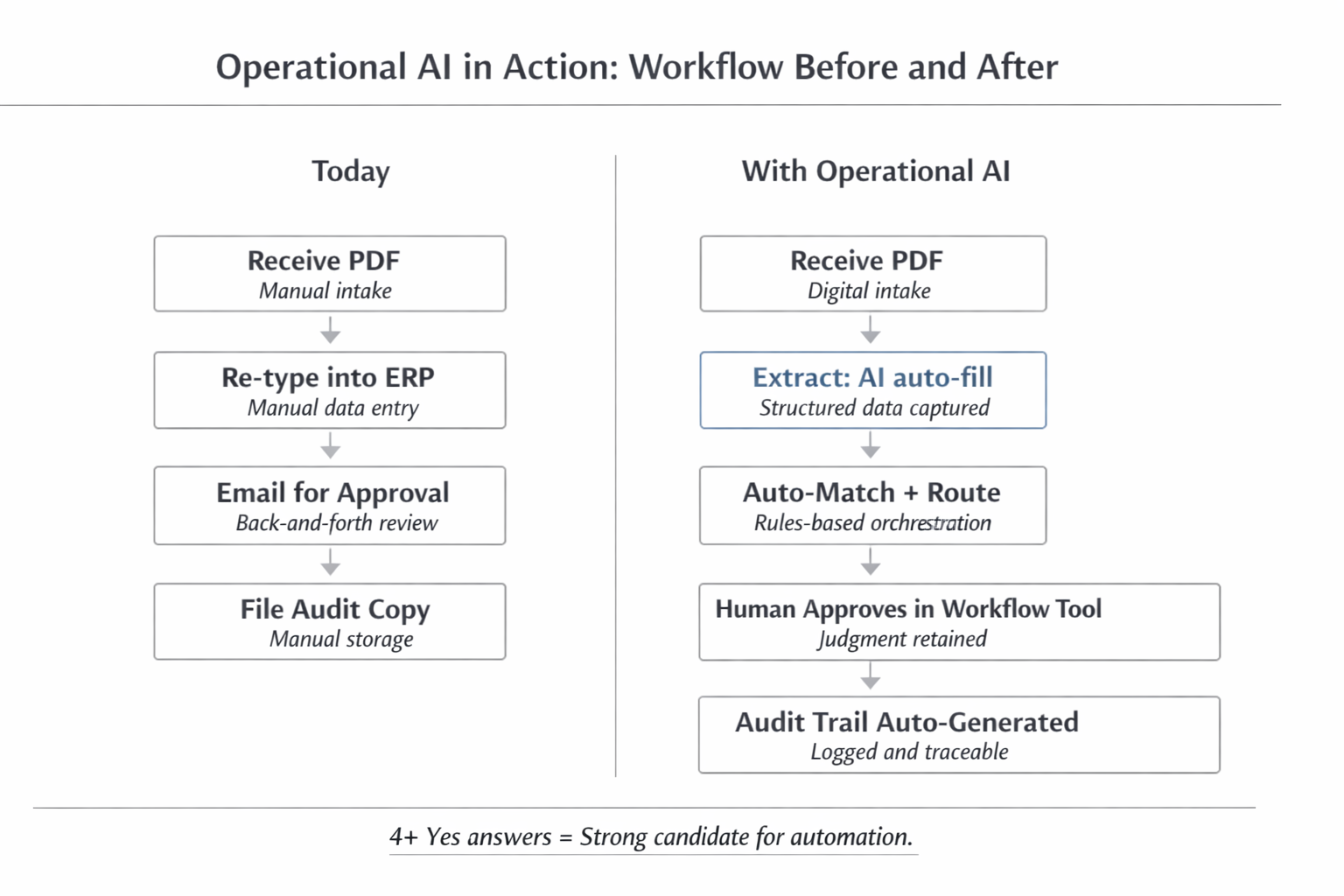
Operational AI in Action — Workflow Before and After
Here’s what it does well:
Extract data from PDFs, forms, and emails using OCR and NLP
Classify documents by type (invoice, contract, ID form, etc.)
Pre-fill systems like ERPs or CRMs with structured data
Route documents to the correct approvers automatically
Generate audit logs and summaries for compliance or follow-up
These are not science experiments. They are practical, low-risk AI capabilities that already power back-office processes in finance, logistics, and healthcare.
What This Looks Like in Practice: Realistic Examples
1. Financial Services — Invoice Processing
A regional bank processes over 5,000 invoices a month. With AI:
- Data is automatically extracted and matched to POs
- Exceptions are flagged for review
- All steps are logged for audit
Turnaround dropped from 10 days to under 3
1.5 FTEs were reallocated to strategic analysis
2. Logistics — Shipment Exception Handling
A logistics provider automated the triage of shipment issues:
- AI classifies the exception (delayed, lost, misrouted)
- The case is routed to the right handler
- AI drafts customer communication
30% fewer escalations
20% faster resolution time
3. Healthcare — Patient Intake Forms
A specialty clinic digitized its handwritten intake forms using OCR + AI.
30–60 minutes saved per form
Lower printing and paper costs
Nurses refocused on care—not data entry
When This May Not Be the Right Fit
Not every workflow benefits from AI automation. Avoid applying it when:
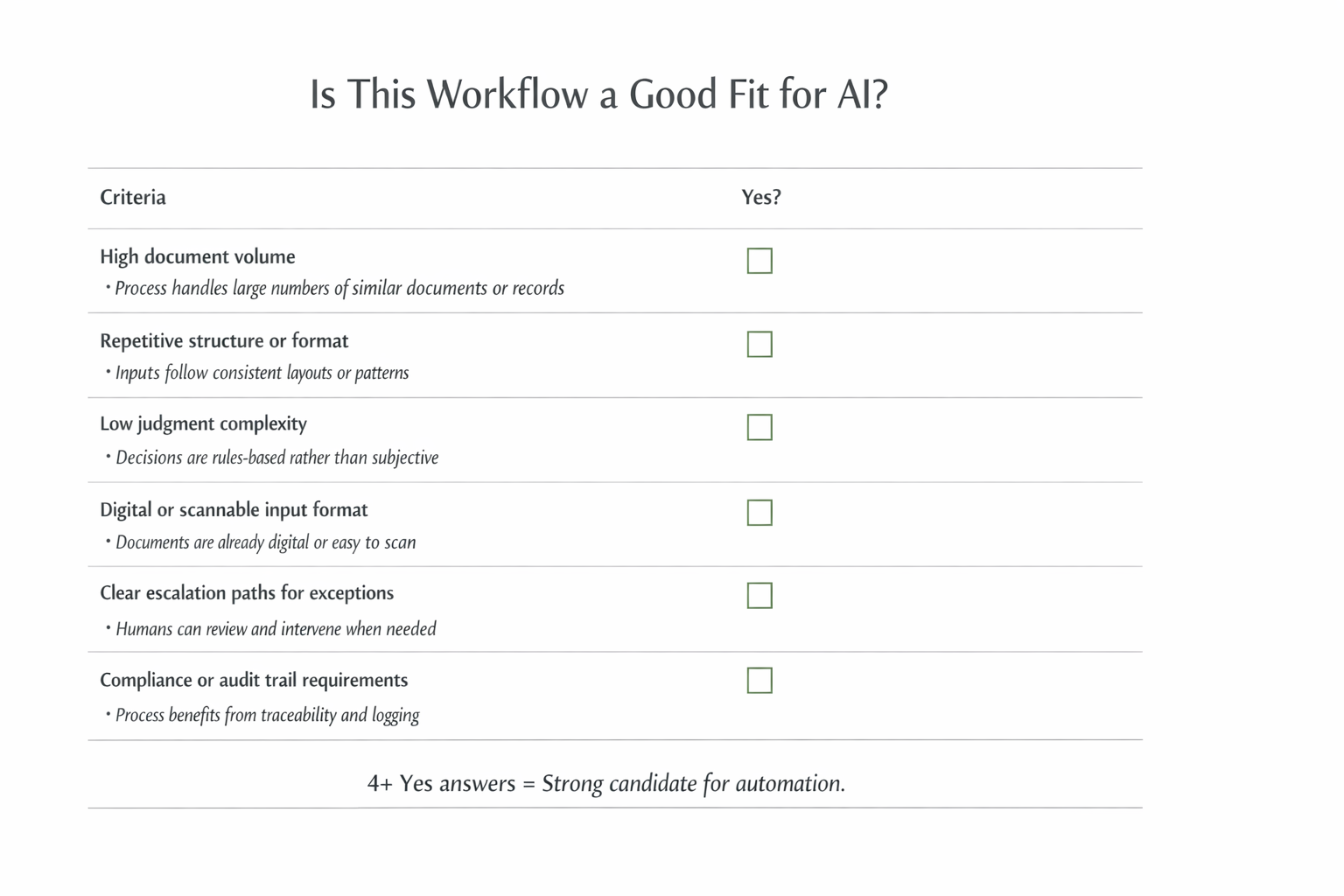
Is This Workflow a Good Fit for AI?
- Workflows are low-volume or highly unique
- Data is inconsistent or not digitized
- Judgment complexity is high
- Audit or explainability standards can’t be met
What Should Leaders Do? A Practical Roadmap
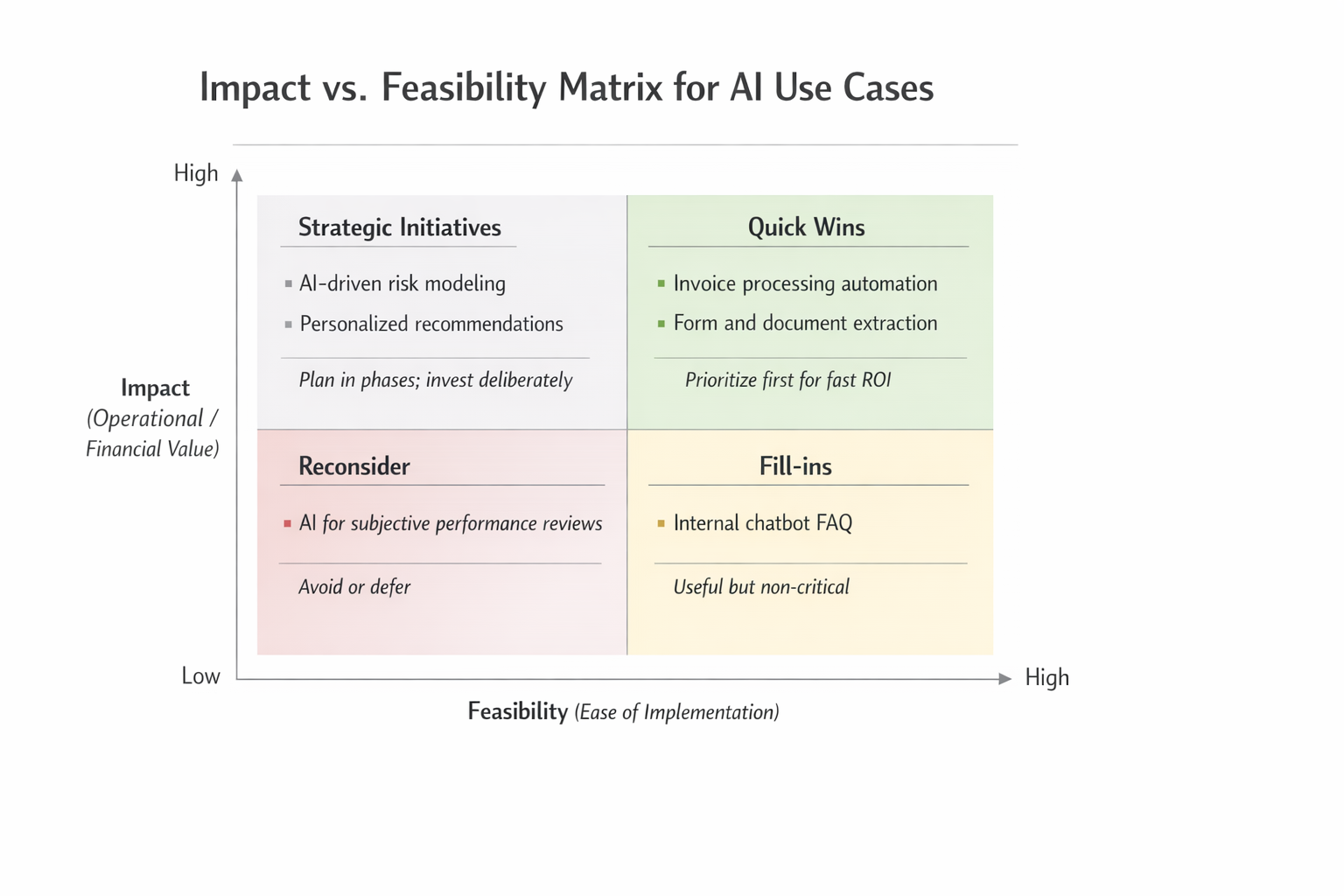
Impact vs. Feasibility Matrix for AI Use Cases
Here’s a simple playbook to get started:
Inventory paperwork-heavy processes
Look at AP, onboarding, HR requests, claims.
Prioritize using a 2×2 matrix
Score each process for impact and feasibility.
Select 1–2 quick wins
High volume + repeatable structure = ideal pilot.
Run a short AI pilot (4–8 weeks)
Focus on measurable results.
Use an orchestration platform
Coordinate humans, systems, and AI with full governance.
Track success metrics
Time saved, errors avoided, turnaround improved.
What Should Leaders Watch Out For? Risks and Pitfalls
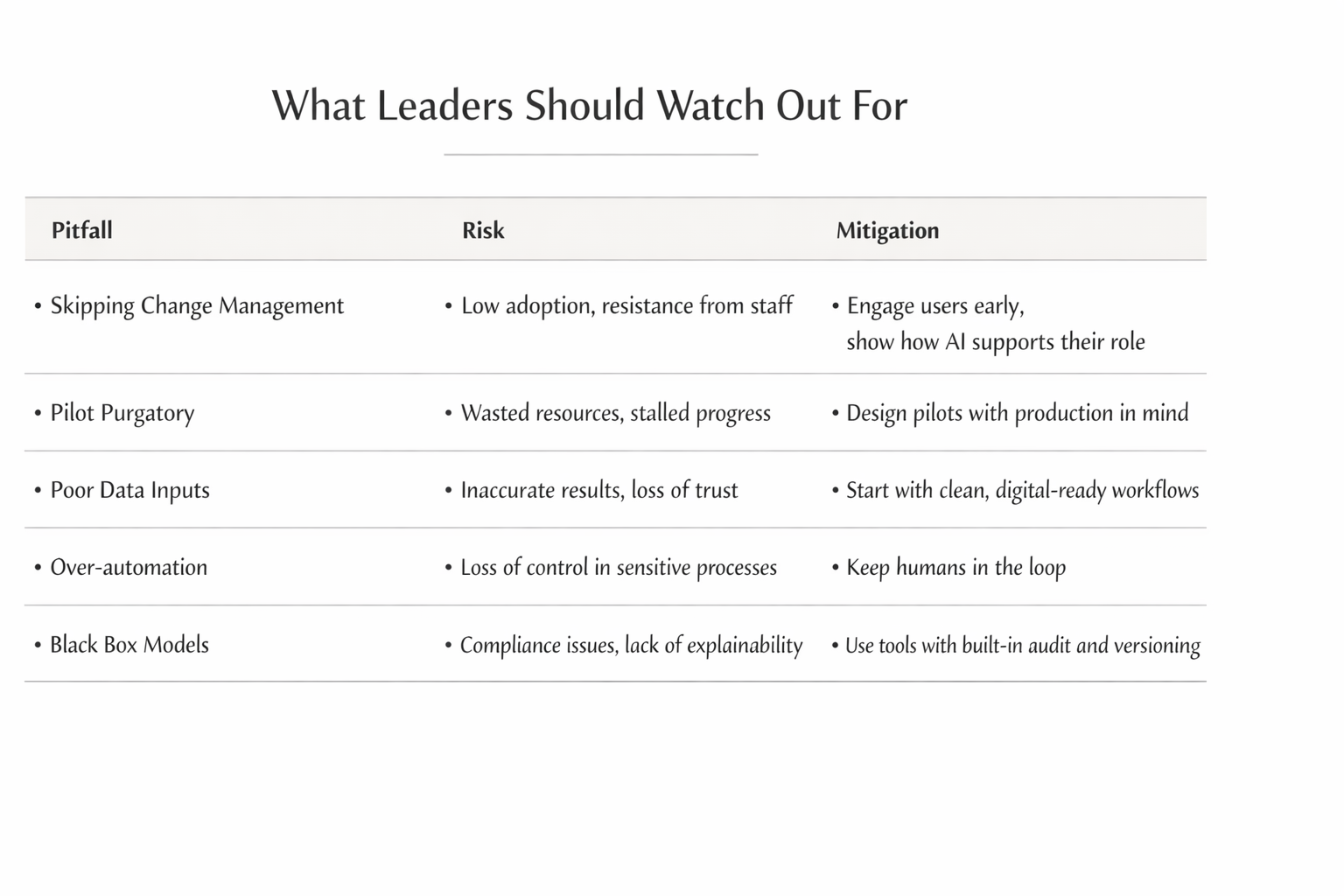
What Leaders Should Watch Out For
Over-automation — Keep humans involved in sensitive decisions
Pilot purgatory — Design for scale, not just experimentation
Dirty or siloed data — Start with clean, consistent workflows
Lack of governance — Use platforms with audit logs and access controls
Change resistance — Communicate clearly and involve staff early
Key Takeaways for Business Leaders
- Operational AI streamlines paperwork-heavy workflows without opaque decisioning
- Target high-volume, low-complexity tasks for quick ROI
- Run short, focused pilots before scaling solutions
- Use orchestration platforms for governance and integration
- Avoid pilot purgatory by designing with production in mind
- Focus on measurable value: time saved, errors reduced, throughput increased
Executive FAQ
Can AI really handle finance and compliance-related documents?
Yes—if implemented with proper controls. AI can extract, route, and summarize data with full auditability and human oversight.
Where do I start?
Focus on workflows with high document volume and repeatable logic. AP, vendor onboarding, and claims processing are strong starting points.
What if we lack internal AI expertise?
That’s common. Many firms partner with orchestration platforms or firms like Sentia Digital to design, build, and operate Operational AI systems.
Ready to Automate the Paperwork?
Sentia Digital helps mid-market organizations identify high-impact AI opportunities and deliver production-ready solutions. Most clients see tangible results in 8–12 weeks.
Start an AI Opportunity Assessment →