
Invoice Automation Is Not an AI Problem. It Is a Workflow Design Problem
How mid-market companies can move invoices from inbox to ERP with control, exceptions, and real ROI.
Executive Summary
Many mid-market organizations still process invoices through a patchwork of email, spreadsheets, and manual data entry. While AI-based tools such as OCR and document extraction promise automation, most initiatives stall because the underlying workflow remains fragmented.
The real challenge is not teaching AI to read invoices. It is designing a controlled, end-to-end process that routes, validates, approves, and posts invoices reliably.
What Do We Mean by These Terms?
Operational AI — AI embedded into a live business workflow with clear ownership, defined success metrics, exception handling, and governance.
AI Opportunity — A specific step in a workflow where AI can measurably reduce manual effort or improve accuracy.
AI Pilot — A limited, controlled implementation using real data and real users to validate value and feasibility.
Production Deployment — A scaled implementation with stable integrations, monitoring, access controls, and repeatable operating procedures.
Feasibility — The practical ability to implement given data quality, invoice variability, integration constraints, and organizational readiness.
Orchestration Platform — The workflow layer that routes invoices, applies business rules, manages approvals and exceptions, and connects systems.
What Is Broken Today? The Operational Reality
In many mid-market companies, invoice processing looks simple on paper but messy in practice.
Invoices arrive through multiple channels: email PDFs from suppliers, scanned paper invoices, and occasional uploads to vendor portals. AP teams download attachments, rename files, and manually key header and line item data into the ERP.
This process has several structural weaknesses:
- Manual data entry introduces errors and rework
- Email-based approvals hide work in inboxes and create bottlenecks
- Exceptions such as missing POs or price mismatches consume disproportionate time
- Limited visibility makes it difficult to see what is pending and why
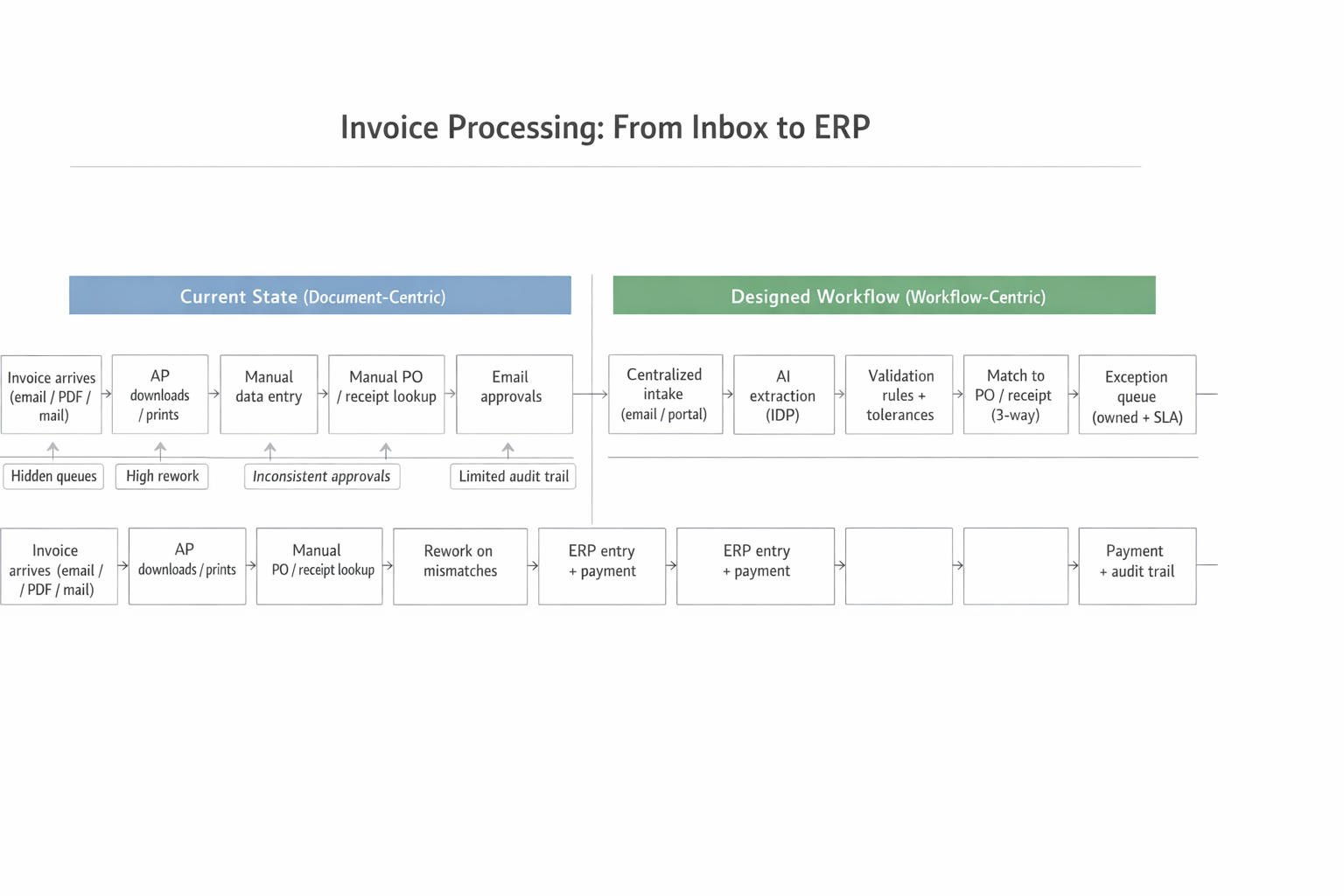
Invoice Processing: Current State vs. Designed Workflow
Average cycle times for manual invoices often exceed 8+ days, driven more by approval delays than data entry itself.
Adding OCR alone does not fix this. OCR converts PDFs into text, but it does not decide where an invoice goes, who approves it, or how exceptions are resolved. Without workflow redesign, automation simply moves work downstream instead of removing it.
Why Does This Matter? Cost, Efficiency, Risk, and Experience
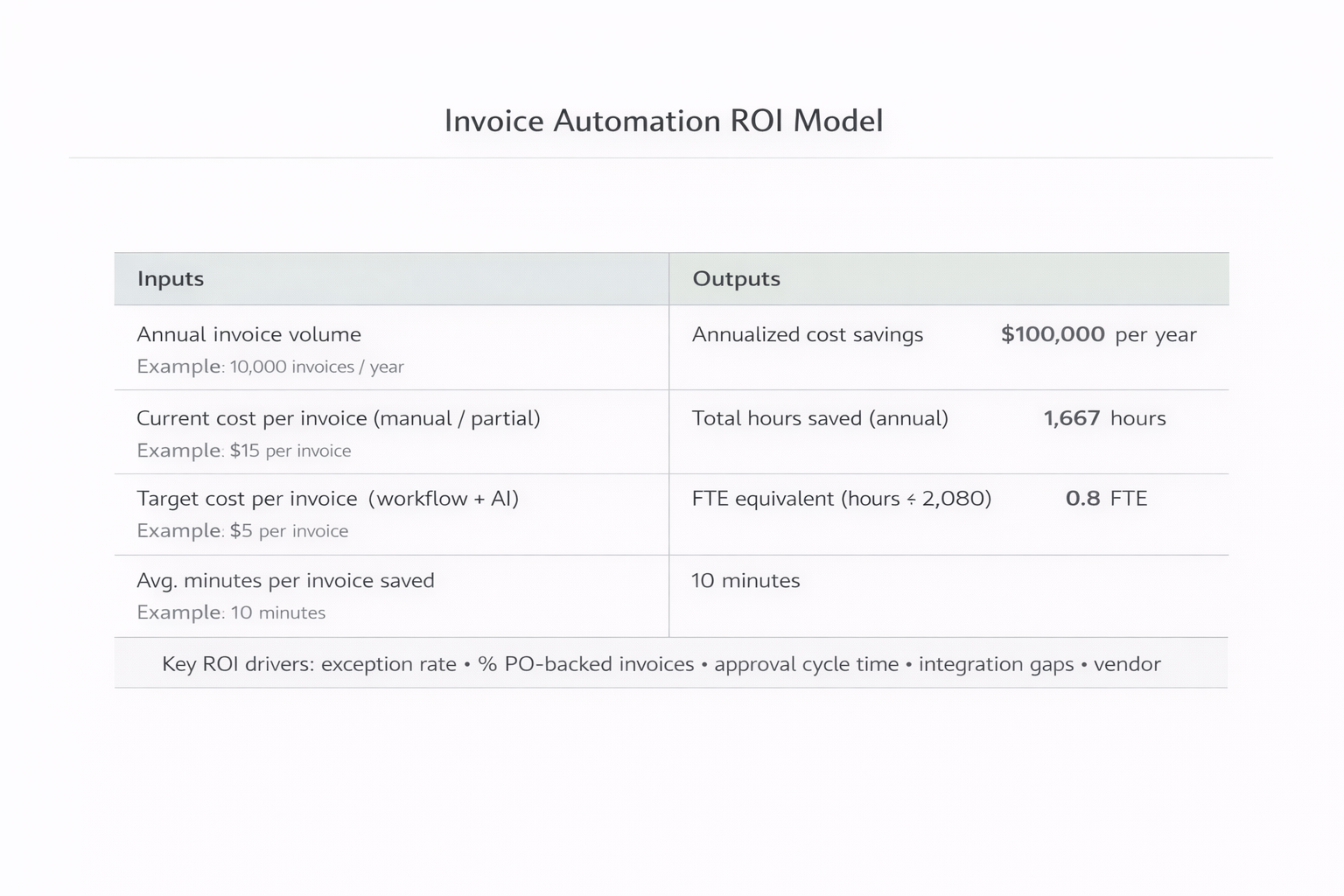
Invoice Automation ROI Model
Cost and Capacity
For example: 20,000 invoices per year at $15 per invoice manually = $300,000 annual processing cost. Reducing that to $5 per invoice through workflow automation yields $200,000 in annual savings—typically one to three full-time employees worth of capacity.
Efficiency and Cycle Time
Long approval cycles delay payments, frustrate vendors, and reduce operational flexibility. In industries such as healthcare, logistics, and hospitality, delayed payments can directly disrupt service delivery.
Risk and Compliance
Email-based processes expose companies to fraud and control failures. Business email compromise remains a leading cause of payment fraud. Weak audit trails make it difficult to prove who approved what and when.
Vendor and Internal Experience
Frequent vendor inquiries about payment status are a symptom of poor visibility. Structured workflows reduce noise and allow AP teams to focus on exceptions rather than clerical work.
How Does AI Apply in Practice?
AI plays a valuable but bounded role in invoice automation. It supports specific steps within a broader system rather than replacing it.
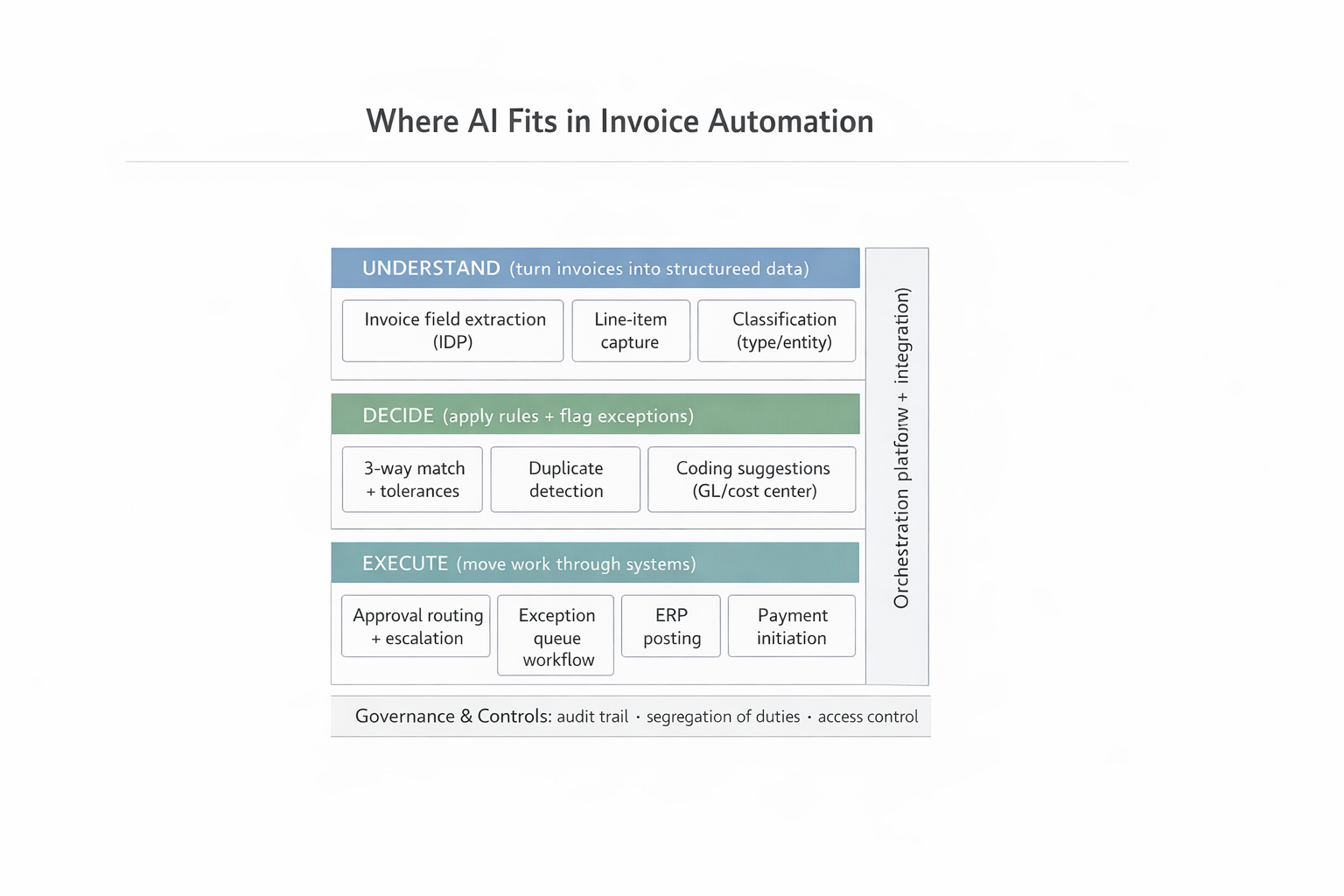
Where AI Fits in Invoice Automation
Understand
Turns unstructured invoices into structured data: invoice field extraction, line item capture across varied layouts, classification by invoice type, and confidence scoring to determine when human review is needed.
Decide
Applies business logic: three-way matching against POs and receipts, duplicate invoice detection, coding suggestions for GL accounts, and anomaly detection for unusual amounts or vendor changes.
Execute
Moves work through systems: approval routing with escalation, exception queues with ownership and SLAs, ERP posting and payment initiation, and audit logging. This is where orchestration matters.
How Does This Work in Practice? Realistic Examples
Regional Freight Forwarder
Processed tens of thousands of invoices from hundreds of carriers. Redesigned intake around a single invoice mailbox with AI extraction and classification.
Hospital Group
Hundreds of thousands of invoices under strict audit requirements. Emphasized validation, approval controls, and auditability.
Multi-Location Operator
Property managers approved invoices via email, causing stalled approvals. Implemented mobile approvals with escalation rules.
What Should Leaders Do? A Practical Implementation Path
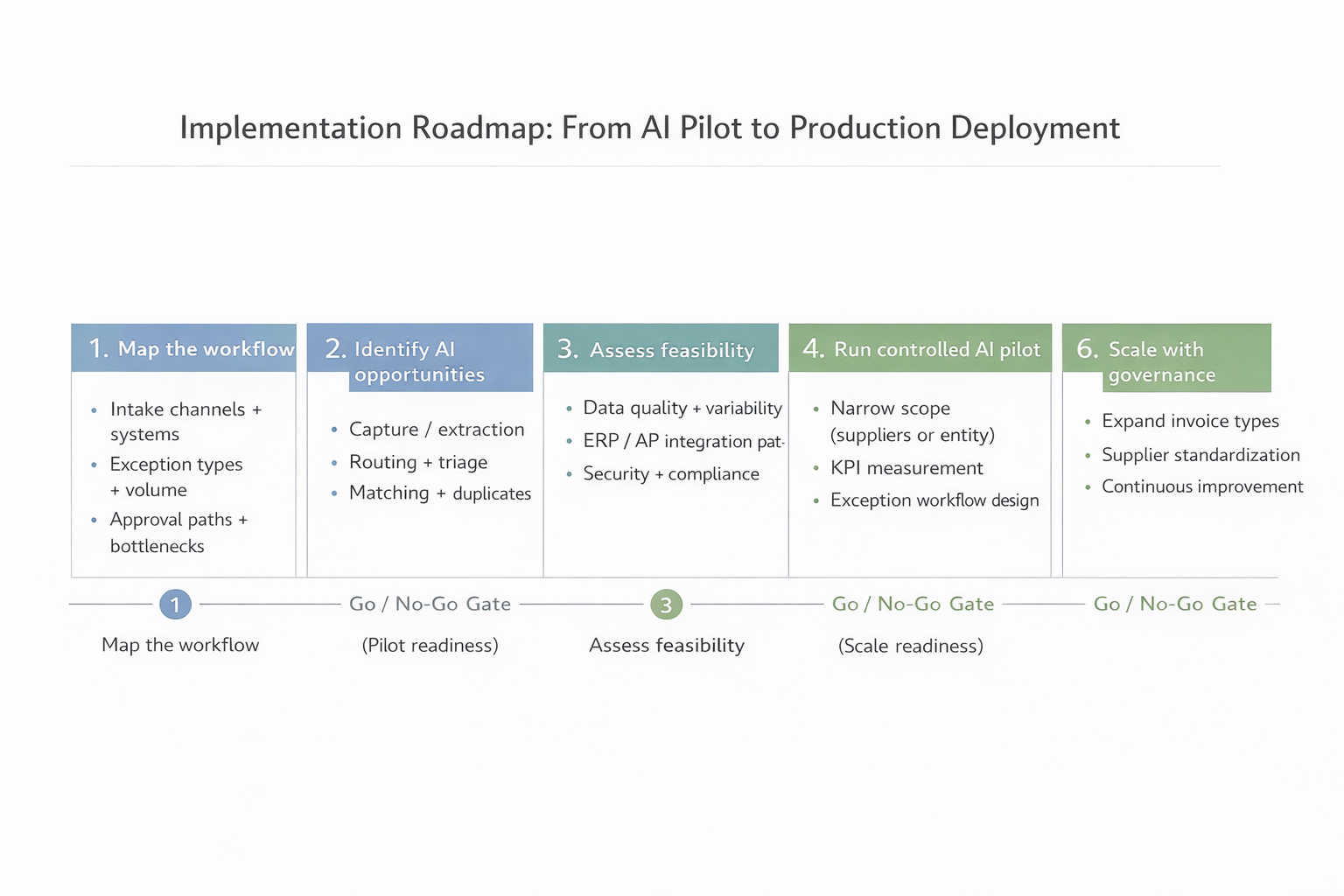
Implementation Roadmap: From AI Pilot to Production Deployment
Map the Real Workflow
Document how invoices actually move today—intake channels, systems touched, approval paths, and exception types.
Identify High-Leverage AI Opportunities
Focus on repetitive, high-volume steps: extraction, classification, duplicate detection. Avoid edge cases initially.
Assess Feasibility
Evaluate data quality, ERP integration options, security requirements, and organizational change capacity.
Run a Controlled AI Pilot
Limit scope by supplier group or invoice type. Define clear metrics: percent auto-captured, cycle time, exception rate, cost per invoice.
Harden for Production
Stabilize integrations, implement role-based controls, monitoring dashboards, and audit logs. Train users.
Scale with Governance
Expand to additional invoice types and suppliers. Use metrics to guide continuous improvement.
Common Pitfalls and How to Avoid Them
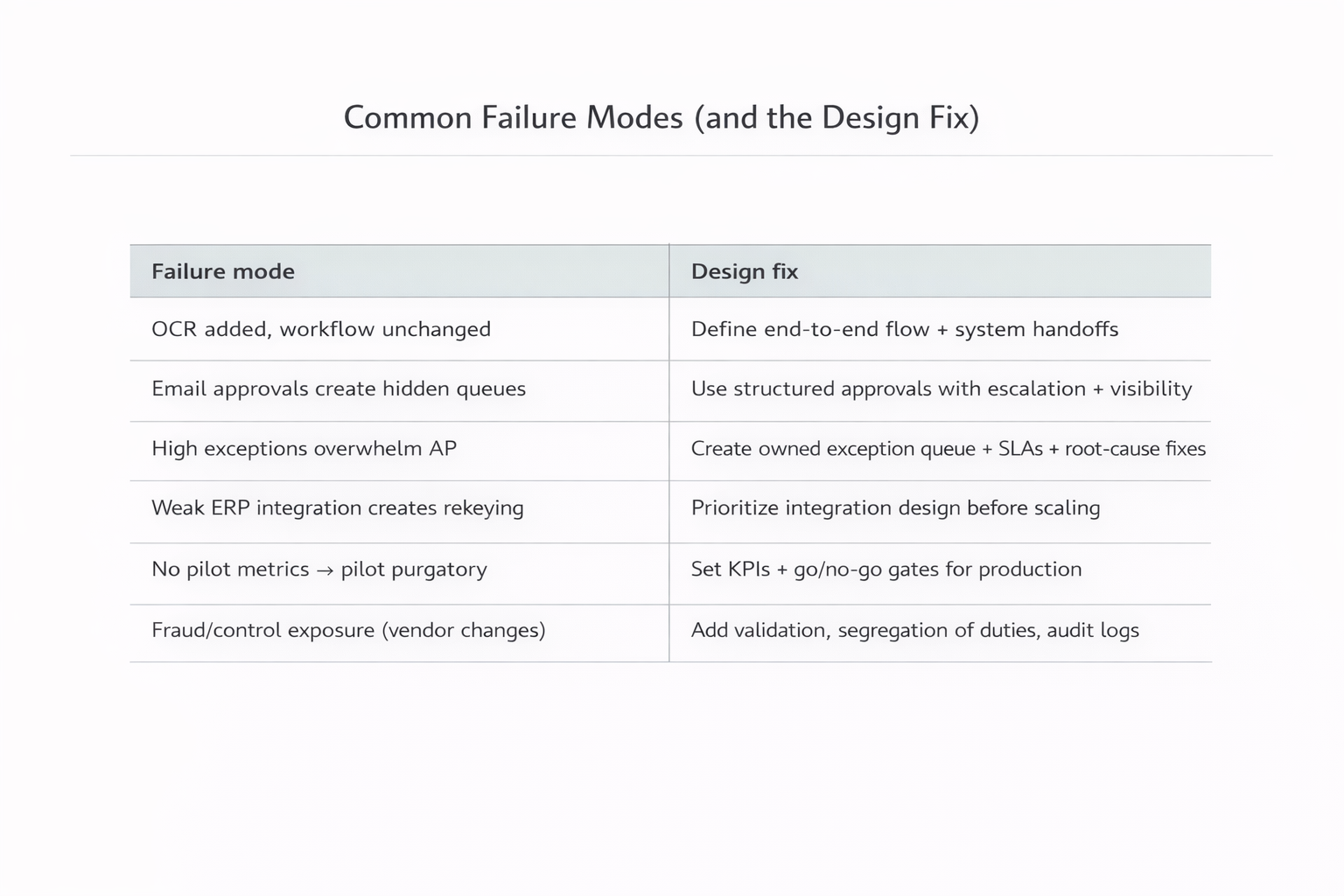
Common Failure Modes and the Design Fix
When This Approach May Not Be Appropriate
Invoice automation may not be the right immediate investment when:
- Invoice volumes are very low
- Inputs are highly inconsistent with no path to standardization
- ERP integration is not feasible and workarounds are unacceptable
In these cases, foundational process or system changes may be required first.
Executive FAQ
How long does a realistic pilot take?
Most focused pilots run four to eight weeks, depending on integration complexity and invoice volume.
What level of automation is realistic?
Many mid-market organizations achieve 60 to 80 percent straight-through processing for targeted invoice types, with the remainder handled through exception workflows.
Does this eliminate AP jobs?
Typically no. It reallocates effort from data entry to exception handling, vendor support, and analysis.
Key Takeaways for Business Leaders
- Invoice automation succeeds or fails based on workflow design, not AI sophistication
- AI delivers value when embedded into a governed, end-to-end process
- Cost per invoice, cycle time, and risk reduction are the primary value drivers
- Start with a focused pilot tied to real operating metrics
- Expect exceptions and design for them
- Scale only after integrations, controls, and ownership are clear
Ready to Automate Your Invoice Processing?
Sentia Digital helps leaders identify practical automation opportunities, assess feasibility, and define a clear path from pilot to production.
Explore AI Opportunity Assessment →